QCustomTableToolbar
QCustomTableToolbar ships in Custom Widgets Pro. It is not part of the free GPLv3 package from 2.6.0 onward — the free package keeps the import path so Qt Designer forms still load, and installing Pro activates the widget with no code change. Releases up to 2.5.0 included it under the GPLv3.
Pro is licensed software and is not installable from PyPI — the name there is a pointer package with no widgets in it. Licence holders download the wheel from their account:
# https://portal.customwidgets.org/downloads
pip install <the downloaded .whl>
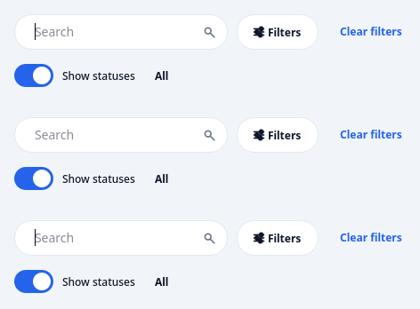
A rich filter/search bar for data tables.
The companion chrome above a QCustomDataTable, modelled on modern SaaS "Jobs / Records" screens (search + Filters button + removable filter chips + Clear filters, and a second row of colour-coded status pills with counts and a Show-statuses switch). It owns no data - it just emits intent:
searchChanged(str) the search text changed (debounced by typing) filtersClicked() the Filters button was pressed filterChipRemoved(str) a filter chip's x was clicked (its key) clearFiltersClicked() the Clear filters link was pressed statusSelected(str) a status pill was picked ("" == the All pill) showStatusesToggled(bool) the Show-statuses switch flipped
Colours track the active theme through setThemeColors(...) (call it after applyDesignTokens); each status keeps its own semantic hue for its pill.
At a glance
| Tier | Pro |
| Import | from Custom_Widgets.QCustomTableToolbar import QCustomTableToolbar |
| Qt Designer | Yes — drag it from the palette |
Quick start
from Custom_Widgets.QCustomTableToolbar import QCustomTableToolbar

widget = QCustomTableToolbar()
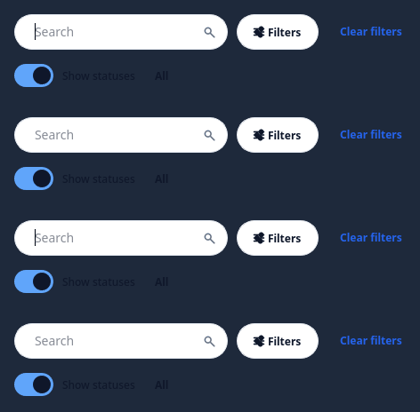
Dark theme
Colours come from the design tokens, so the widget follows the app theme with no extra work.
Properties
Every property below is settable in code and in Qt Designer.
| Property | Type | Default |
|---|---|---|
searchPlaceholder | string | Search |
Signals
| Signal |
|---|
clearFiltersClicked() |
filterChipRemoved(QString) |
filtersClicked() |
searchChanged(QString) |
showStatusesToggled(bool) |
statusSelected(QString) |
Methods
| Method | Description |
|---|---|
activeStatus() | Active status. |
addFilterChip(key, label, value=None) | Add a filter chip. |
clearFilterChips() | Clear the filter chips. |
clearFiltersClicked(...) | Clear the filters clicked. |
filterChipKeys() | Filter chip keys. |
filterChipRemoved(...) | Filter chip removed. |
filtersClicked(...) | Filters clicked. |
removeFilterChip(key) | Remove a filter chip. |
searchChanged(...) | Search changed. |
searchInput() | Search input. |
searchPlaceholder(*args, **kwargs) | Search placeholder. |
searchText() | Search text. |
setActiveStatus(key) | Set the active status. |
setFilterChips(items) | Replace all filter chips. Each item is (key, label[, value]) or a |
setSearchPlaceholder(text) | Set the search placeholder. |
setSearchText(text) | Set the search text. |
setShowStatuses(on) | Set the show statuses. |
setStatusCount(key, count) | Set the status count. |
setStatuses(items) | Rebuild the status pills (the built-in All pill is kept first). |
setThemeColors(surface=None, on_surface=None, muted=None, outline=None, accent=None) | Track the active theme. Pass token role values (call after |
showStatuses() | Show the statuses. |
showStatusesToggled(...) | Show the statuses toggled. |
statusSelected(...) | Status selected. |
Related
QCustomCodeEditor · QCustomDataTable · QCustomNodeGraph · QCustomRichTextEditor · QCustomTreeWidget