QCustomAvatarGroup
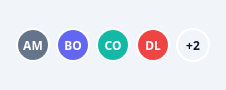
A row of overlapping avatars with overflow.
Circular initials-avatars overlap; beyond maxVisible a "+N" chip shows
the remainder. Each avatar's colour is derived deterministically from its
name. The separating ring colour comes from tokens (qproperty ringColor).
At a glance
| Tier | Free (GPLv3) |
| Import | from Custom_Widgets.QCustomAvatarGroup import QCustomAvatarGroup |
| Qt Designer | Yes — drag it from the palette |
Quick start
from Custom_Widgets.QCustomAvatarGroup import QCustomAvatarGroup

widget = QCustomAvatarGroup()
widget.setAvatars(["Amara Mensah", "Ben Ortiz", "Chidi Okafor", "Dana Levy",
          "Eli Novak", "Farah Aziz"])
That is the exact code behind the screenshot above.
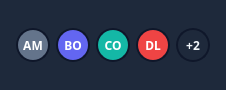
Dark theme
Colours come from the design tokens, so the widget follows the app theme with no extra work.
Properties
Every property below is settable in code and in Qt Designer.
| Property | Type | Default |
|---|---|---|
maxVisible | int | 4 |
ringColor | color | — |
overflowBg | color | — |
overflowText | color | — |
Methods
| Method | Description |
|---|---|
maxVisible(*args, **kwargs) | Max visible. |
names() | Names. |
overflowBg(*args, **kwargs) | Overflow bg. |
overflowText(*args, **kwargs) | Overflow text. |
ringColor(*args, **kwargs) | Ring color. |
setAvatars(names) | Set the avatars. |
Theming
Colours come from the design tokens, so they follow the active theme. Roles used: surface, surface-muted, on-surface.
See Design tokens.
Related
QCustomAgendaList · QCustomAlert · QCustomAvatar · QCustomBadge · QCustomCard · QCustomChip · QCustomChipGroup · QCustomClockLabel