QCustomDataTablePro
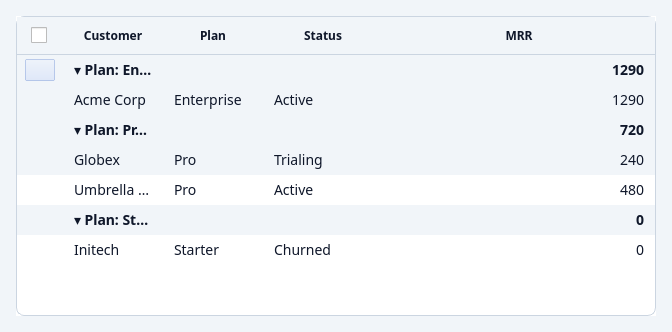
QCustomDataTablePro is the commercial, production-grade data grid. It
subclasses the free QCustomDataTable through stable
extension seams, so everything you already do — columns, setData, sorting,
selection, theming — carries over unchanged. Swap the class, gain the
features.
QCustomDataTablePro ships in the separate custom-widgets-pro package. It
requires a valid entitlement to develop with; applications you ship run
royalty-free (no runtime licence check). See Licensing.
The free QCustomDataTable remains fully functional on its own.
# free
from Custom_Widgets.QCustomDataTable import QCustomDataTable, DataTableColumn
# pro — same columns/data/API
from custom_widgets_pro import QCustomDataTablePro
What Pro adds
Free (QCustomDataTable) | Pro (QCustomDataTablePro) |
|---|---|
| Client-side sort / filter / paginate | Virtualization (100k+ rows) + server-side sort/filter push-down |
| Fixed columns | Frozen (pinned) columns |
| Read-only cells | Inline editing + validation |
| In-memory rows | Lazy DataProvider (DB / API) |
| — | Grouping + aggregation and pivot |
| — | CSV / Excel (XLSX) export |
Data & virtualization
Feed rows in-memory (still virtualized) or from a lazy provider:
table = QCustomDataTablePro()
table.setColumns([...])                 # same DataTableColumn descriptors

table.setData(rows)                     # in-memory list, loaded lazily
# or a lazy window-fetching source:
table.setFetchCallback(lambda offset, limit: db.fetch(offset, limit), total=100_000)
# or a full provider (sort/filter push-down):
table.setDataProvider(MyProvider())
| Method | Description |
|---|---|
setData(rows) / setRows(rows) | Feed an in-memory list through the virtualized path. |
setFetchCallback(fetch_fn, total=None) | Virtualize over fetch_fn(offset, limit) -> rows. |
setDataProvider(provider) | Attach a DataProvider (below). |
loadedRowCount() / totalRowCount() | Loaded window size / full total. |
Data providers
A DataProvider supplies rows in windows so the grid never holds more than what
has been scrolled to; sort and filter are pushed down to the source:
from custom_widgets_pro import DataProvider, ListDataProvider, CallableDataProvider

class MyProvider(DataProvider):
    def totalRowCount(self, filter=None): ...
    def fetch(self, offset, limit, sort=None, filter=None): ...  # -> list of dicts
ListDataProvider(rows)— an in-memory reference provider with full sort/filter push-down.CallableDataProvider(fetch_fn, total=None)— adapt a plain callable.
Server-side sort & filter
sortBy(column, order) and setFilterText(text) push down to the provider, so
ordering and filtering are correct across the whole dataset, not just the
loaded window.
Frozen (pinned) columns
table.setFrozenColumnCount(2)     # pin the leftmost 2 columns
table.pinColumns(["name"])        # or pin by key (freezes up to that column)
Inline editing + validation
table.setEditable(["price", "qty"])          # or True (all) / False (none)
table.setColumnValidator("price", lambda v: v >= 0 or "must be ≥ 0")
table.cellEdited.connect(lambda row, key, old, new: ...)
table.validationFailed.connect(lambda row, key, value, msg: ...)
Values are coerced to the column type; bool columns render a checkbox.
Grouping + aggregation
Group by one or more columns, with per-group aggregates on the headers:
table.groupBy(["category"], {"amount": "sum", "qty": "avg"})
- Aggregates:
sum/avg/count/min/max/first/last, or a callablefn(values) -> result. - Click a group header (or use the methods) to expand/collapse.
| Method | Description |
|---|---|
groupBy(keys, aggregates=None) | Group by column key(s); groupBy([]) clears. |
clearGrouping() / groupKeys() / isGrouped() | Manage grouping. |
expandAllGroups() / collapseAllGroups() / toggleGroup(row) | Expand/collapse. |
groupToggled(path, expanded) (signal) | Emitted when a group toggles. |
Pivot (cross-tab)
Reshape into a matrix — one row per index value, one column per distinct
columns value, each cell an aggregate of values:
table.pivot(index="region", columns="product", values="sales", aggfunc="sum")
table.clearPivot()
pivot(index, columns, values, aggfunc="sum", totals=True, fill=None). Grouping
and pivot are mutually exclusive (each clears the other).
Export (CSV / XLSX)
table.exportTo("out.csv")                 # or "out.xlsx"
table.exportTo("report.xlsx", sheetName="Sales")
Exports respect the current sort + filter and stream rows (a large export is not held in memory). XLSX uses a pure-stdlib writer — no extra dependency.
Signals
In addition to the free table's signals:
| Signal | Description |
|---|---|
cellEdited(row, key, old, new) | A cell value was edited. |
validationFailed(row, key, value, message) | An edit was rejected. |
groupToggled(path, expanded) | A group header was expanded/collapsed. |
Getting Pro
custom-widgets-pro is distributed separately. Availability, install, and terms
are covered on the Licensing page (the free core
stays open source; Pro is the commercial add-on that funds the project).