Getting started
By the end of this page you will have a running window, built from Custom
Widgets, that switches between light and dark themes. No .ui files, no
resource compiler, no JSON — just Python.
Install
pip install QT-PyQt-PySide-Custom-Widgets
You also need a Qt binding. PySide6 is the best supported:
pip install PySide6
See Installation for PyQt5/PyQt6 notes.
Your first window
Create main.py:
import sys
from qtpy.QtWidgets import QApplication, QWidget, QVBoxLayout

from Custom_Widgets.JSonStyles.tokens import applyDesignTokens
from Custom_Widgets.QCustomStatCard import QCustomStatCard
from Custom_Widgets.QCustomQPushButton import QCustomQPushButton

app = QApplication(sys.argv)

window = QWidget()
window.resize(360, 240)
layout = QVBoxLayout(window)

card = QCustomStatCard(label="Monthly recurring revenue",
                       value="$48,320",
                       delta="12.4%", trend="up",
                       caption="vs last month")
layout.addWidget(card)

button = QCustomQPushButton("Save changes")
button.variant = "primary"
layout.addWidget(button)

# One call themes every Custom Widget in the app.
applyDesignTokens(app, theme="light")

window.show()
sys.exit(app.exec())
python main.py
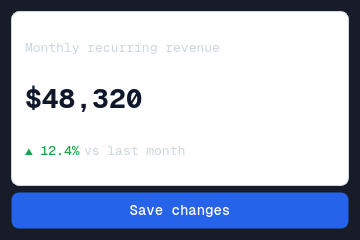
That is a themed window with two real widgets in about twenty lines.
Switch the theme
applyDesignTokens is idempotent — call it again with the other theme and
everything follows:
applyDesignTokens(app, theme="dark")
There is nothing else to change. Colours come from design tokens, so any widget that styles itself from the semantic roles flips with the app.
Two ways to build
You have just used the code-first path. There is a second one.
| Code-first | Forms pipeline | |
|---|---|---|
| You write | Python | .ui files in Qt Designer |
| Good for | Small apps, demos, embedding widgets in an existing app | Real applications with many screens |
| Theming | applyDesignTokens | JSON themes + SCSS $TOKENS |
| Start here | This page | Project Maker |
Both use the same widgets. You can mix them.
Pick your widgets
The Widget gallery is a thumbnail index of all 164 widgets, grouped by the job you are doing — layout, navigation, forms, data display, charts, feedback, chat, media. Each card links to a reference page with a runnable snippet.
Use them in Qt Designer
Every widget is a real Designer plugin. Once the package is installed they appear in the palette and their custom properties are editable in the property editor, so a designer can lay out a form without touching Python.
See Designer tools, and Hot reload to have the app restart as you save a form.
Where to go next
- Widget gallery — see everything at a glance
- Design tokens — how theming actually works
- Styling guide — QSS and SCSS
- Basic usage — longer worked examples
- Licensing — GPLv3, and when you need a commercial licence
Prefer video? There is a tutorial playlist on YouTube.