QCustom3CirclesLoader
Copyright 2021
by Parham Oyan and Oleg Frolov
Edits and improvements: Khamisi Kibet
QT GUI by: SPINN TV (YouTube)
License: GPL 3.0
Overview
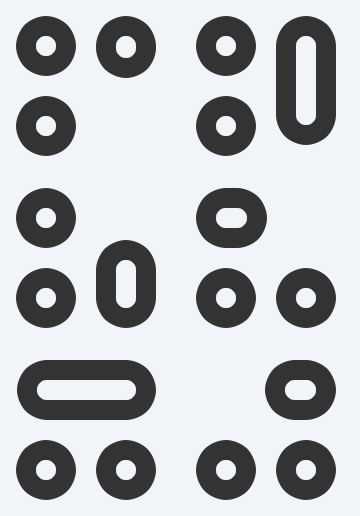
QCustom3CirclesLoader is a custom animated loader widget built using Qt. Inheriting from QFrame, it displays three animated rounded rectangles that move and resize in a coordinated sequence to simulate a loading animation. This widget is ideal for indicating progress or activity in your Qt applications.
Key Features
-
Customizable Appearance:
Set the loader’s color, pen width, and animation duration. -
Smooth Animations:
UsesQVariantAnimationandQSequentialAnimationGroupwith easing curves to create fluid movement. -
Dynamic Geometry:
Animates three rounded rectangles by updating their position and size in multiple directions. -
Custom Painting:
OverridespaintEventto draw rounded rectangles with anti-aliasing.
Classes
1. RoundedRect
A simple helper class representing a rectangle with rounded corners.
-
Attributes:
x(float): X-coordinate.y(float): Y-coordinate.w(float): Width.h(float): Height.
-
Usage Example:
rect = RoundedRect(x=10, y=10, w=40, h=40)
2. QCustom3CirclesLoader
A custom loader widget that animates three rounded rectangles.
Constructor
QCustom3CirclesLoader(
    parent=None,
    color=QColor("#333333"),
    penWidth=20,
    animationDuration=400
)
- Parameters:
parent: Parent widget.color: The drawing color (default is dark gray).penWidth: Width of the pen used for drawing.animationDuration: Duration (in milliseconds) for each animation segment.
Initialization
-
initRects()
Initializes threeRoundedRectobjects based on the pen width.- The rectangles are positioned to form a triangular layout.
-
startAnimations()
Combines multiple animation groups (move down, right, up, left) into one sequential group that loops the animation sequence (set to loop 10 times).- When the sequence finishes, the order of rectangles is rotated via the
finished()method.
- When the sequence finishes, the order of rectangles is rotated via the
Animation Methods
-
Animation Group Initializers:
initMoveDownAnimation()initMoveRightAnimation()initMoveUpAnimation()initMoveLeftAnimation()
Each method creates a
QSequentialAnimationGroupcontaining one or moreQVariantAnimationinstances. These animations update properties such as:- Position and Size:
For example,moveDownUpdateH(newValue)updates the height of the second rectangle, andmoveRightUpdateX(newValue)updates the x-coordinate of the first rectangle.
-
Helper Method:
getVariantAnimation()
Creates aQVariantAnimationconfigured with the specified duration and an InOutSine easing curve.
-
Update Methods:
Methods likemoveDownUpdateY(),moveRightUpdateW(), etc., update the respective properties of the rectangles and callupdate()to trigger a repaint. -
finished()Method:
Called at the end of the animation sequence to rotate the order of the rectangles inself.rectsList, ensuring continuous dynamic animation.
Painting
paintEvent(e)
Overrides the default paint event:- Creates a
QPainterand sets up aQPenusing the defined color and pen width. - Draws each rounded rectangle from
self.rectsListwith a fixed corner radius (20). - Ensures anti-aliased rendering for smooth visuals.
- Creates a
Usage Example
from qtpy.QtWidgets import QApplication
from qtpy.QtGui import QColor
from Custom_Widgets.LoadingIndicators import QCustom3CirclesLoader

if __name__ == "__main__":
    app = QApplication([])

    # Create an instance of the loader with custom parameters
    loader = QCustom3CirclesLoader(
        color=QColor("#FF5733"),    # Custom color (e.g., a shade of orange)
        penWidth=15,                # Custom pen width
        animationDuration=500       # Animation duration of 500ms per segment
    )

    loader.show()
    app.exec_()
Notes
-
Customization:
You can modify thecolor,penWidth, andanimationDurationparameters to suit your application's style. -
Animation Loop:
The overall animation loop is set to run 10 times (gp.setLoopCount(10)). Adjust this value if you need a continuous loop. -
Integration:
This widget can be integrated into any Qt application that usesqtpyas the abstraction layer, making it compatible with both PyQt and PySide.
This documentation should help you understand and integrate QCustom3CirclesLoader from the Custom_Widgets.LoadingIndicators module into your Qt projects, offering a visually appealing and customizable loader animation.
API reference
Generated from the widget's live metaobject — do not edit by hand.
Properties
| Property | Type | Default |
|---|---|---|
frameShape | QFrame::Shape | — |
frameShadow | QFrame::Shadow | — |
lineWidth | int | — |
midLineWidth | int | — |
frameWidth | int | — |
frameRect | QRect | — |
Methods
| Method | Description |
|---|---|
finished() | Finished. |
getVariantAnimation() | Return the variant animation. |
initMoveDownAnimation() | Init move down animation. |
initMoveLeftAnimation() | Init move left animation. |
initMoveRightAnimation() | Init move right animation. |
initMoveUpAnimation() | Init move up animation. |
initRects() | Init rects. |
moveDownUpdateH(newValue) | Move down update H. |
moveDownUpdateY(newValue) | Move down update Y. |
moveLeftUpdateH(newValue) | Move left update H. |
moveLeftUpdateX(newValue) | Move left update X. |
moveRightUpdateW(newValue) | Move right update W. |
moveRightUpdateX(newValue) | Move right update X. |
moveUpUpdateH(newValue) | Move up update H. |
moveUpUpdateY(newValue) | Move up update Y. |
startAnimations() | Start the animations. |
Theming
Colours come from the design tokens, so they follow the active theme. Roles used: accent.
See Design tokens.