QCustomCodeEditor
QCustomCodeEditor ships in Custom Widgets Pro. It is not part of the free GPLv3 package from 2.6.0 onward — the free package keeps the import path so Qt Designer forms still load, and installing Pro activates the widget with no code change. Releases up to 2.5.0 included it under the GPLv3.
Pro is licensed software and is not installable from PyPI — the name there is a pointer package with no widgets in it. Licence holders download the wheel from their account:
# https://portal.customwidgets.org/downloads
pip install <the downloaded .whl>
Note:
This class is part of the qtpy Custom Widgets project (GPL 3.0 - Kadir Aksoy).
It relies on JSON files located in the themes and syntax folders (with pre-defined syntax rules and themes).
Remember: Include these folders in your package when installing the project manually.
GitHub Repository
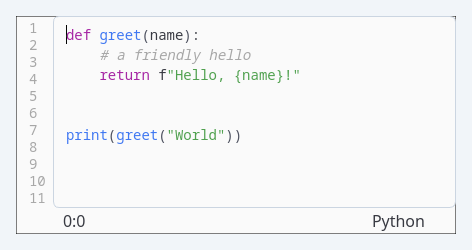
QCustomCodeEditor is a powerful, syntax-highlighting code editor widget that provides professional code editing capabilities with theme support, line numbering, and multiple programming language syntax highlighting.
Overview
-
Syntax Highlighting:
Supports multiple programming languages including Python, C++, and plain text with extensible syntax rules. -
Theme Customization:
Multiple built-in themes with customizable color schemes for different coding preferences. -
Line Numbering:
Displays line numbers with proper alignment and scrolling synchronization. -
Real-time Cursor Tracking:
Shows current cursor position (line:column) in the status bar. -
File Loading:
Automatic language detection based on file extensions with encoding support.
Constructor
QCustomCodeEditor()
Creates a new code editor instance with default settings.
Key Properties
lang (str)
-
Purpose:
Current programming language for syntax highlighting. -
Supported Values:
"python","cpp","c++","plain"
theme (str)
-
Purpose:
Current color theme for the editor. -
Supported Values:
"default","one-light","one-dark","monokai","oceanic","zenburn"
Methods
setTheme(theme)
-
Description:
Applies a color theme to the code editor. -
Parameters:
theme: Theme name string
-
Features:
- Updates syntax highlighting colors
- Applies background and text colors
- Refreshes line number display
- Updates status bar colors
-
Example:
code_editor.setTheme("one-dark")
setLang(lang)
-
Description:
Sets the programming language for syntax highlighting. -
Parameters:
lang: Language identifier string
-
Behavior:
- Loads appropriate syntax rules
- Updates language display in status bar
- Reapplies syntax highlighting
-
Example:
code_editor.setLang("python")
loadFile(filepath, encoding="utf-8")
-
Description:
Loads code from a file with automatic language detection. -
Parameters:
filepath: Path to the source fileencoding: File encoding (default: "utf-8")
-
Auto-detection:
.pyfiles → Python.cppfiles → C++- Other files → Plain text
-
Example:
code_editor.loadFile("script.py")
paintEvent(event)
- Description:
Custom painting for line numbers and background elements.
Usage Example
Basic Code Editor
from Custom_Widgets.QCustomCodeEditor import QCustomCodeEditor

# Create code editor
editor = QCustomCodeEditor()

# Set language and theme
editor.setLang("python")
editor.setTheme("one-dark")

# Load existing code file
editor.loadFile("example.py")
Multiple Editors with Theme Switching
import sys
from qtpy.QtWidgets import QApplication, QMainWindow, QVBoxLayout, QWidget, QLabel, QToolBar, QPushButton
from functools import partial
from Custom_Widgets.QCustomCodeEditor import QCustomCodeEditor

class CodeEditorWindow(QMainWindow):
    def __init__(self):
        super().__init__()

        # Main container
        container = QWidget()
        layout = QVBoxLayout(container)
        self.setCentralWidget(container)

        # Create multiple editors
        self.editor1 = QCustomCodeEditor()
        self.editor1.setLang("python")
        self.editor1.setTheme("default")

        self.editor2 = QCustomCodeEditor()
        self.editor2.setLang("cpp")
        self.editor2.setTheme("default")

        # Add to layout
        layout.addWidget(QLabel("Python Editor"))
        layout.addWidget(self.editor1)
        layout.addWidget(QLabel("C++ Editor"))
        layout.addWidget(self.editor2)

        # Theme switching toolbar
        self.create_theme_toolbar()

    def create_theme_toolbar(self):
        toolbar = QToolBar("Themes")
        self.addToolBar(toolbar)

        themes = ["Default", "One Light", "One Dark", "Monokai", "Oceanic", "Zenburn"]
        for theme in themes:
            btn = QPushButton(theme)
            theme_id = theme.lower().replace(" ", "-")
            btn.clicked.connect(partial(self.apply_theme, theme_id))
            toolbar.addWidget(btn)

    def apply_theme(self, theme):
        self.editor1.setTheme(theme)
        self.editor2.setTheme(theme)

app = QApplication(sys.argv)
window = CodeEditorWindow()
window.show()
sys.exit(app.exec_())
Custom Syntax Highlighter Integration
class CustomCodeEditor(QCustomCodeEditor):
    def __init__(self):
        super().__init__()

        # Custom initialization
        self.setLang("python")
        self.setTheme("monokai")

    def load_custom_file(self, filepath):
        """Enhanced file loading with custom logic"""
        try:
            self.loadFile(filepath)
            print(f"Successfully loaded: {filepath}")
        except Exception as e:
            print(f"Error loading file: {e}")

    def get_text(self):
        """Get current editor text"""
        return self.editor.toPlainText()

    def set_text(self, text):
        """Set editor text"""
        self.editor.setPlainText(text)
Theme Management System
class ThemeManager:
    def __init__(self):
        self.available_themes = [
            "default", "one-light", "one-dark",
            "monokai", "oceanic", "zenburn"
        ]
        self.current_theme = "default"

    def apply_theme_to_editor(self, editor, theme):
        """Apply theme to a specific editor"""
        if theme in self.available_themes:
            editor.setTheme(theme)
            self.current_theme = theme
            return True
        return False

    def cycle_theme(self, editor):
        """Cycle through available themes"""
        current_index = self.available_themes.index(self.current_theme)
        next_index = (current_index + 1) % len(self.available_themes)
        next_theme = self.available_themes[next_index]
        self.apply_theme_to_editor(editor, next_theme)
        return next_theme

# Usage
theme_manager = ThemeManager()
editor = QCustomCodeEditor()
theme_manager.apply_theme_to_editor(editor, "one-dark")
Syntax Highlighting Features
Supported Languages
- Python: Full syntax highlighting with keywords, strings, comments, numbers
- C++: Keywords, preprocessor directives, operators, braces
- Plain Text: Basic text editing without syntax highlighting
Highlighting Elements
- Keywords: Language-specific reserved words
- Strings: Single and multi-line string literals
- Comments: Single-line and multi-line comments
- Numbers: Integer, float, and hexadecimal numeric literals
- Operators: Mathematical and logical operators
- Braces: Parentheses, brackets, and curly braces
- Functions: Function names and calls
- Preprocessor: C/C++ preprocessor directives
Theme Elements
- Background color
- Line number background
- Line number text
- Identifier/text color
- Syntax element colors (keywords, strings, comments, etc.)
Advanced Features
Custom Syntax Rules
# The syntax highlighter uses JSON-based rule definitions
# located in CodeEditorSyntax/ folder
# You can extend support by adding new language definition files
Scroll Synchronization
- Line numbers automatically scroll with code content
- Proper alignment maintained during vertical scrolling
- Efficient repainting for performance
Status Bar Information
- Cursor Position: Real-time line and column tracking
- Language Display: Current syntax highlighting language
- Theme Integration: Colors update with theme changes
File Structure Requirements
project/
├── main_app.py
└── Custom_Widgets/
    ├── QCustomCodeEditor.py
    ├── CodeEditorThemes/
    │   ├── default.json
    │   ├── one-light.json
    │   ├── one-dark.json
    │   └── ...
    └── CodeEditorSyntax/
        ├── python.json
        ├── cpp.json
        └── ...
Additional Notes
- Performance: Efficient highlighting with regular expression matching
- Extensibility: Easy to add new languages and themes via JSON files
- Compatibility: Works with both PyQt and PySide bindings
- Customization: All visual elements can be themed
- Memory Management: Proper cleanup and resource handling
The QCustomCodeEditor is ideal for IDEs, code viewers, configuration editors, educational tools, and any application requiring professional code editing capabilities with syntax highlighting and theme support.
API reference
Generated from the widget's live metaobject — do not edit by hand.
Methods
| Method | Description |
|---|---|
loadFile(filepath, encoding='utf-8') | Load the file. |
setLang(lang) | Set the lang. |
setTheme(theme) | Set the theme. |