QCustomFlowLayout
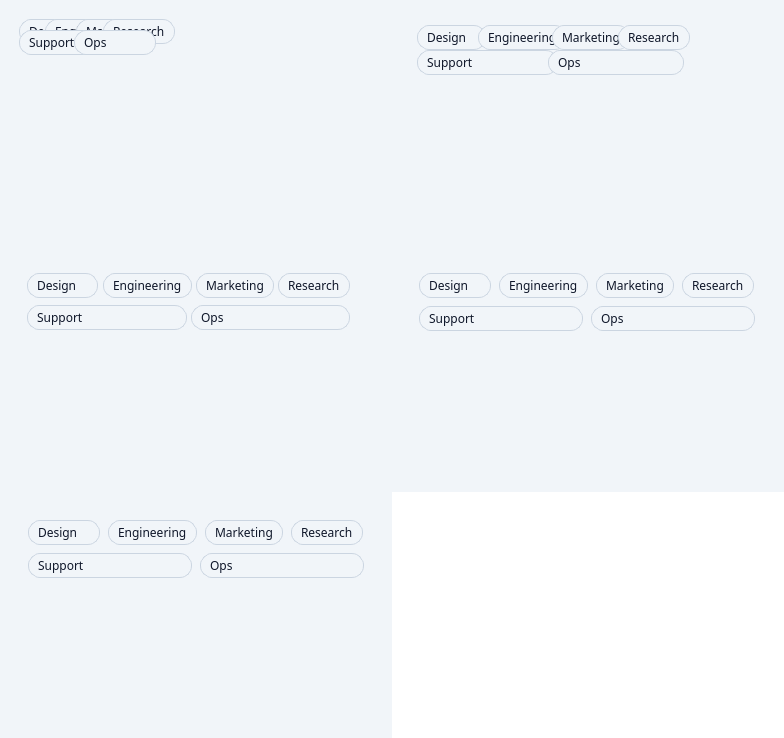
QCustomFlowLayout is a custom layout manager that arranges widgets in a flow pattern, similar to how text flows in a document. Widgets are positioned left to right, then top to bottom, automatically wrapping to the next line when space runs out.
Overview
-
Flow-Based Arrangement:
Automatically arranges widgets in a left-to-right, top-to-bottom flow pattern. -
Dynamic Wrapping:
Intelligently wraps widgets to new lines based on available width. -
Flexible Positioning:
Supports inserting widgets at specific positions with alignment options. -
Size-Aware:
Automatically adjusts height based on content width. -
Memory Efficient:
Proper cleanup of layout items to prevent memory leaks.
Constructor
QCustomFlowLayout(parent=None, margin=0, spacing=-1)
-
parent:
The parent widget (defaults toNone). -
margin:
Margin around the layout in pixels (default: 0). -
spacing:
Spacing between widgets in pixels. -1 uses the style's default spacing.
Key Methods
addWidget(w, position=None, align=None)
-
Description:
Adds a widget to the layout with optional positioning and alignment. -
Parameters:
w: Widget to addposition: Insert position index (optional)align: Alignment flags (optional)
-
Example:
# Add widget at specific position with center alignment
layout.addWidget(button, position=2, align=QtCore.Qt.AlignCenter)
addItem(item)
- Description:
Adds a layout item to the layout (internal QLayout method).
count()
- Description:
Returns the number of items in the layout.
itemAt(index)
- Description:
Returns the layout item at the specified index.
takeAt(index)
- Description:
Removes and returns the layout item at the specified index.
hasHeightForWidth()
- Description:
ReturnsTruesince the layout's height depends on its width.
heightForWidth(width)
- Description:
Calculates the required height for a given width.
minimumSize()
- Description:
Returns the minimum size required for the layout.
setGeometry(rect)
- Description:
Positions and sizes the layout within the given rectangle.
sizeHint()
- Description:
Returns the preferred size of the layout.
_doLayout(rect, testOnly)
- Description:
Internal method that performs the actual widget positioning.
Usage Example
Basic Flow Layout
from qtpy.QtWidgets import QWidget, QPushButton, QApplication
from Custom_Widgets.QCustomFlowLayout import QCustomFlowLayout

app = QApplication([])

# Create container widget
window = QWidget()
layout = QCustomFlowLayout(window, margin=10, spacing=5)

# Add multiple buttons that will flow automatically
for i in range(15):
    button = QPushButton(f"Button {i+1}")
    layout.addWidget(button)

window.show()
app.exec_()
Advanced Widget Positioning
# Create flow layout with specific spacing
flow_layout = QCustomFlowLayout(spacing=10)

# Add widgets with different positioning
flow_layout.addWidget(QPushButton("First"))
flow_layout.addWidget(QPushButton("Second"))
flow_layout.addWidget(QPushButton("Inserted"), position=1)  # Insert at position 1
flow_layout.addWidget(QPushButton("Aligned"), align=QtCore.Qt.AlignRight)

# The layout will automatically arrange:
# [First] [Inserted] [Second]
# [Aligned]
Dynamic Content Management
class DynamicFlowContainer(QWidget):
    def __init__(self):
        super().__init__()
        self.flow_layout = QCustomFlowLayout(self)

        # Add initial widgets
        self.add_widgets(5)

    def add_widgets(self, count):
        for i in range(count):
            widget = QPushButton(f"Dynamic {len(self.flow_layout._items) + 1}")
            self.flow_layout.addWidget(widget)

    def clear_layout(self):
        # Remove all widgets
        while self.flow_layout.count():
            item = self.flow_layout.takeAt(0)
            if item:
                item.widget().deleteLater()

    def resizeEvent(self, event):
        super().resizeEvent(event)
        # Layout automatically readjusts on resize
Tag Cloud Implementation
class TagCloud(QWidget):
    def __init__(self):
        super().__init__()
        self.flow_layout = QCustomFlowLayout(self, margin=5, spacing=3)

    def add_tag(self, text, color="#e0e0e0"):
        tag = QPushButton(text)
        tag.setStyleSheet(f"""
            QPushButton {{
                background-color: {color};
                border: none;
                padding: 2px 8px;
                border-radius: 10px;
                font-size: 10px;
            }}
        """)
        tag.setFixedHeight(20)
        self.flow_layout.addWidget(tag)
        return tag

# Usage
tag_cloud = TagCloud()
tags = ["Python", "JavaScript", "C++", "Qt", "PySide", "PyQt", "Layout", "Flow"]
colors = ["#ffcccc", "#ccffcc", "#ccccff", "#ffffcc", "#ffccff", "#ccffff"]

for i, tag in enumerate(tags):
    tag_cloud.add_tag(tag, colors[i % len(colors)])
Responsive Card Layout
class CardWidget(QWidget):
    def __init__(self, title, content):
        super().__init__()
        layout = QVBoxLayout(self)
        layout.addWidget(QLabel(f"<b>{title}</b>"))
        layout.addWidget(QLabel(content))
        self.setFixedSize(150, 100)
        self.setStyleSheet("border: 1px solid #ccc; border-radius: 5px; padding: 5px;")

class CardContainer(QWidget):
    def __init__(self):
        super().__init__()
        self.flow_layout = QCustomFlowLayout(self, margin=10, spacing=10)

        # Add cards that will flow responsively
        cards = [
            ("Card 1", "This is the first card with some content"),
            ("Card 2", "Another card with different content"),
            ("Card 3", "Third card in the flow layout"),
            ("Card 4", "Fourth card that might wrap to next line"),
            ("Card 5", "Fifth card demonstrating the flow"),
        ]

        for title, content in cards:
            card = CardWidget(title, content)
            self.flow_layout.addWidget(card)
Advanced Features
Custom Spacing Control
# The layout uses intelligent spacing based on widget styles
flow_layout = QCustomFlowLayout(spacing=15)

# Spacing is calculated using:
# spacing + widget_style.layoutSpacing()
# This ensures consistent spacing with the application's style
Height Calculation
# The layout automatically calculates required height
width = 400
required_height = flow_layout.heightForWidth(width)
print(f"Layout needs {required_height}px height for {width}px width")
Widget Alignment
# Individual widget alignment within their flow position
flow_layout.addWidget(widget1, align=QtCore.Qt.AlignLeft)
flow_layout.addWidget(widget2, align=QtCore.Qt.AlignCenter)
flow_layout.addWidget(widget3, align=QtCore.Qt.AlignRight)
Layout Behavior
Flow Pattern
[Widget1] [Widget2] [Widget3]
[Widget4] [Widget5]
[Widget6] [Widget7] [Widget8]
Responsive Characteristics
- Width Reduction: Widgets wrap to new lines when container narrows
- Width Expansion: Widgets fill available space on current line before wrapping
- Height Adaptation: Layout height automatically adjusts based on content flow
Performance Features
- Efficient Layout: Single-pass layout calculation
- Memory Management: Proper cleanup in destructor
- Minimal Overhead: Lightweight positioning algorithm
Additional Notes
-
Style Integration:
Respects the application's style spacing for consistent appearance. -
Widget Types:
Works with any QWidget-derived objects. -
Dynamic Updates:
Automatically reflows when widgets are added, removed, or resized. -
Container Resize:
Responds to parent container size changes. -
Platform Consistency:
Provides consistent flow behavior across different platforms.
The QCustomFlowLayout is ideal for tag clouds, dynamic button groups, card layouts, image galleries, and any interface where content needs to flow naturally and responsively within a container.
API reference
Generated from the widget's live metaobject — do not edit by hand.
Signals
| Signal |
|---|
animationFinished() |
animationStarted() |
Methods
| Method | Description |
|---|---|
addItem(a0: PySide6.QtWidgets.QLayoutItem) -> None | ALWAYS APPEND - never reorder |
addWidget(w: PySide6.QtWidgets.QWidget, position: int = None, align: PySide6.QtCore.Qt.AlignmentFlag = None) -> None | ALWAYS APPEND - position parameter IGNORED to preserve order |
animationFinished(...) | Animation finished. |
animationStarted(...) | Animation started. |
count() | Count. |
expandingDirections() | Expanding directions. |
hasHeightForWidth() | Return whether it has height for width. |
heightForWidth(width) | Height for width. |
isAnimating() | Return whether the widget is animating. |
itemAt(index: int) -> PySide6.QtWidgets.QLayoutItem | Item at. |
loadOrderFromJson() | Load widget order from JSON file if path is provided |
minimumSize() | Minimum size. |
removeItem(a0: PySide6.QtWidgets.QLayoutItem) -> None | Remove an item. |
removeWidget(w: PySide6.QtWidgets.QWidget) -> None | Remove a widget. |
setAnimated(animate) | Set the animated. |
setAnimationDuration(durationMs) | Set the animation duration. |
setAnimationEasingCurve(curve) | Set the animation easing curve. |
setGeometry(rect) | Set the geometry. |
stopAllAnimations() | Stop the all animations. |
takeAt(index: int) -> PySide6.QtWidgets.QLayoutItem | Take at. |