QCustomFileCard
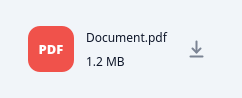
A file / attachment row.
The row seen under the "Files" tab: a painted rounded badge with the file extension ("PDF", "ZIP", …) coloured by type, the file name (elided) and a meta line (size · date), plus a painted download button. Feed it data with setFile(name, size, ext=None, date=None) or the Designer qproperties; the badge colour is auto-picked from the extension unless badgeColor is set. Emits downloadClicked() and clicked(). The card panel + text colours are driven from the app QSS (objectName selectors) so they flip with the theme.
At a glance
| Tier | Free (GPLv3) |
| Import | from Custom_Widgets.QCustomFileCard import QCustomFileCard |
| Qt Designer | Yes — drag it from the palette |
Quick start
from Custom_Widgets.QCustomFileCard import QCustomFileCard

widget = QCustomFileCard()
Dark theme
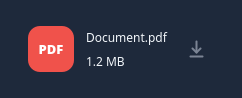
Colours come from the design tokens, so the widget follows the app theme with no extra work.
Properties
Every property below is settable in code and in Qt Designer.
| Property | Type | Default |
|---|---|---|
fileName | string | Document.pdf |
fileSize | string | 1.2 MB |
fileExt | string | — |
fileDate | string | — |
badgeColor | color | #00000000 |
iconColor | color | #7b8494 |
Signals
| Signal |
|---|
clicked() |
downloadClicked() |
Methods
| Method | Description |
|---|---|
badgeColor(*args, **kwargs) | Badge color. |
clicked(...) | Clicked. |
downloadClicked(...) | Download clicked. |
fileDate(*args, **kwargs) | File date. |
fileExt(*args, **kwargs) | File ext. |
fileName(*args, **kwargs) | File name. |
fileSize(*args, **kwargs) | File size. |
iconColor(*args, **kwargs) | Icon color. |
setFile(name, size='', ext=None, date=None) | Set the file. |
Related
QCustomAgendaList · QCustomAlert · QCustomAvatar · QCustomAvatarGroup · QCustomBadge · QCustomCard · QCustomChip · QCustomChipGroup